ICEGATE Shipping Bill Status: How to Check & Track? (2026)

TL;DR - Summary
- What is an ICEGATE shipping bill? - A shipping bill is the customs document you file with Indian customs before your goods leave the country, covering their value, destination and payment terms, and it is mandatory for legal clearance and for claiming export incentives or duty drawbacks.
- How do you check shipping bill status on ICEGATE? - You can check shipping bill status on icegate.gov.in in two ways: guest access through Services, Enquiry, Public Enquiries 2.0, Document Status, or a logged-in view that adds full processing history and the signed PDF download.
- What documents do you need to check shipping bill status? - To check shipping bill status you need three details: the Shipping Bill Number, the Shipping Bill Date, and the customs location or port code where the bill was filed.
- What do the shipping bill status codes mean? - Shipping bill status codes show which stage your export declaration has reached, from submitted and under assessment through LEO Given and EGM Filed, and what you cannot do yet at each stage.
What Is a Shipping Bill?
A shipping bill is an official customs document you file with Indian customs authorities. It carries the details of the goods you are exporting, their value, destination and payment terms. Filing one is mandatory for legal clearance and for claiming export incentives or duty drawbacks.
You or your Customs House Agent (CHA) file the shipping bill before the vessel or aircraft departs. It is the primary record customs use to process an export declaration.
Say a Pune-based garments exporter ships 500 units to a UK buyer. They file a Drawback shipping bill, so they can later claim a refund of the customs duties paid on the fabric imported to make those units.
💡 QUICK INSIGHT
ICEGATE rolled out Public Enquiries 2.0 in February 2026. All legacy enquiry links and standalone status pages have been retired, and every document enquiry now sits under a single dashboard. Two practical changes: the menu path includes an "Enquiry" step before "Document Status," and every enquiry requires you to select your customs location (port code) from a dropdown. Get that field wrong and the portal returns no record even when the shipping bill exists. Several published guides still describe "Public Enquiries 1.0." That path is dead.
Why to Check the Status of Shipping Bill?
Checking your shipping bill status on ICEGATE lets you monitor customs clearance in real time, avoid penalties, and unlock financial benefits like GST refunds, duty drawback and export incentives.
- Track customs clearance: see whether your export declaration is submitted, under processing, or flagged for a query, so you can act before a small issue becomes a costly delay.
- Catch errors early: identify wrong HS codes, invoice mismatches, or missing AD codes before they cause port delays or refund rejections, and fix them before the next shipment repeats the same mistake.
- Verify Let Export Order (LEO): confirm that the official customs permission to load and export the goods has been granted. The LEO date is also the official export date used for GST refunds and duty drawback calculations.
- Check Export General Manifest (EGM) filing: verify that the shipping line has filed the EGM, which proves the goods have physically left the country. It is a prerequisite for IGST refund processing.
- Claim export incentives: track and process government benefits including Duty Drawback, RoDTEP, RoSCTL and IGST refunds, all of which depend on confirmed shipping bill milestones.
- Match data with GSTR-1: confirm that shipping bill data aligns with your GST return filings, so refund discrepancies do not surface later.
- Monitor RBI and bank compliance: help your bank track export proceeds and close EDPMS entries within regulatory timelines. Delays in status updates can stall bank closure.
- Keep proof ready: the status record and the downloadable signed PDF serve as documentation for banks, auditors and partner verification.
How to Check Shipping Bill Status on ICEGATE?
There are two ways to check your shipping bill status on ICEGATE. Guest access needs no login and is enough for most exporters. The logged-in route gives you detailed processing history and document downloads.
Checking Shipping Bill Status Without Login (Guest Access)
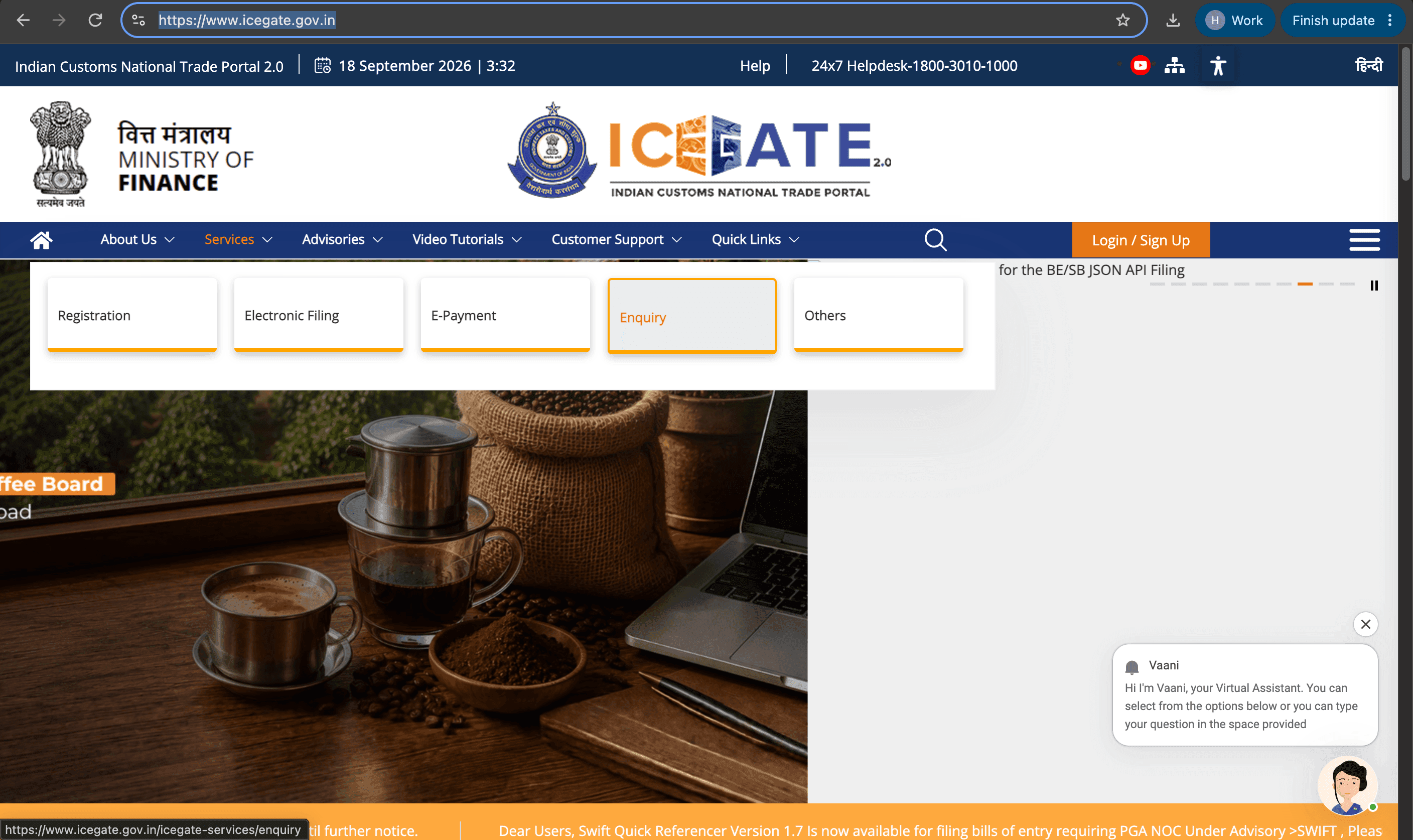
- Go to icegate.gov.in, hover over "Services" in the top menu, and click "Enquiry.".
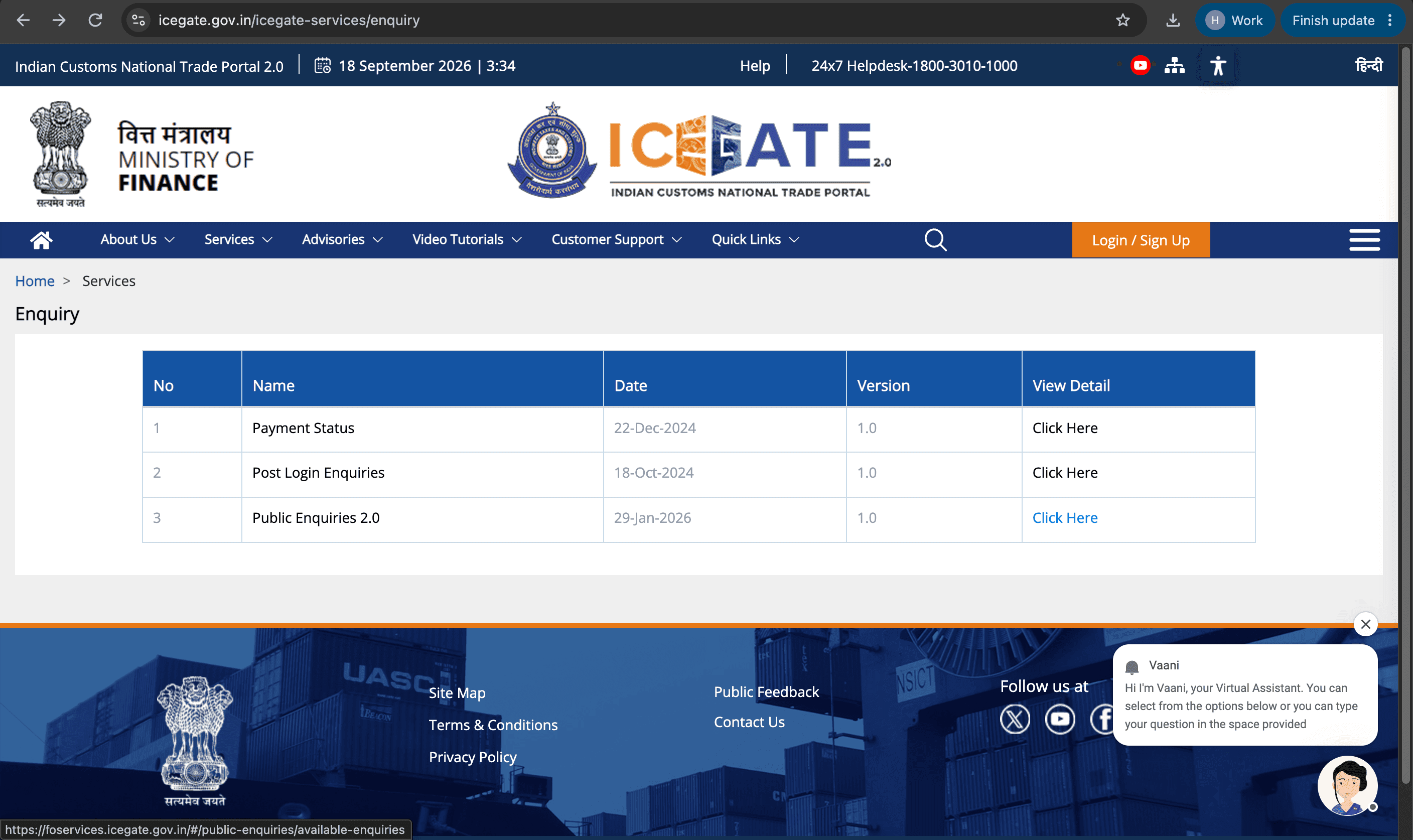
- Under Enquiry, select "Public Enquiries 2.0.".
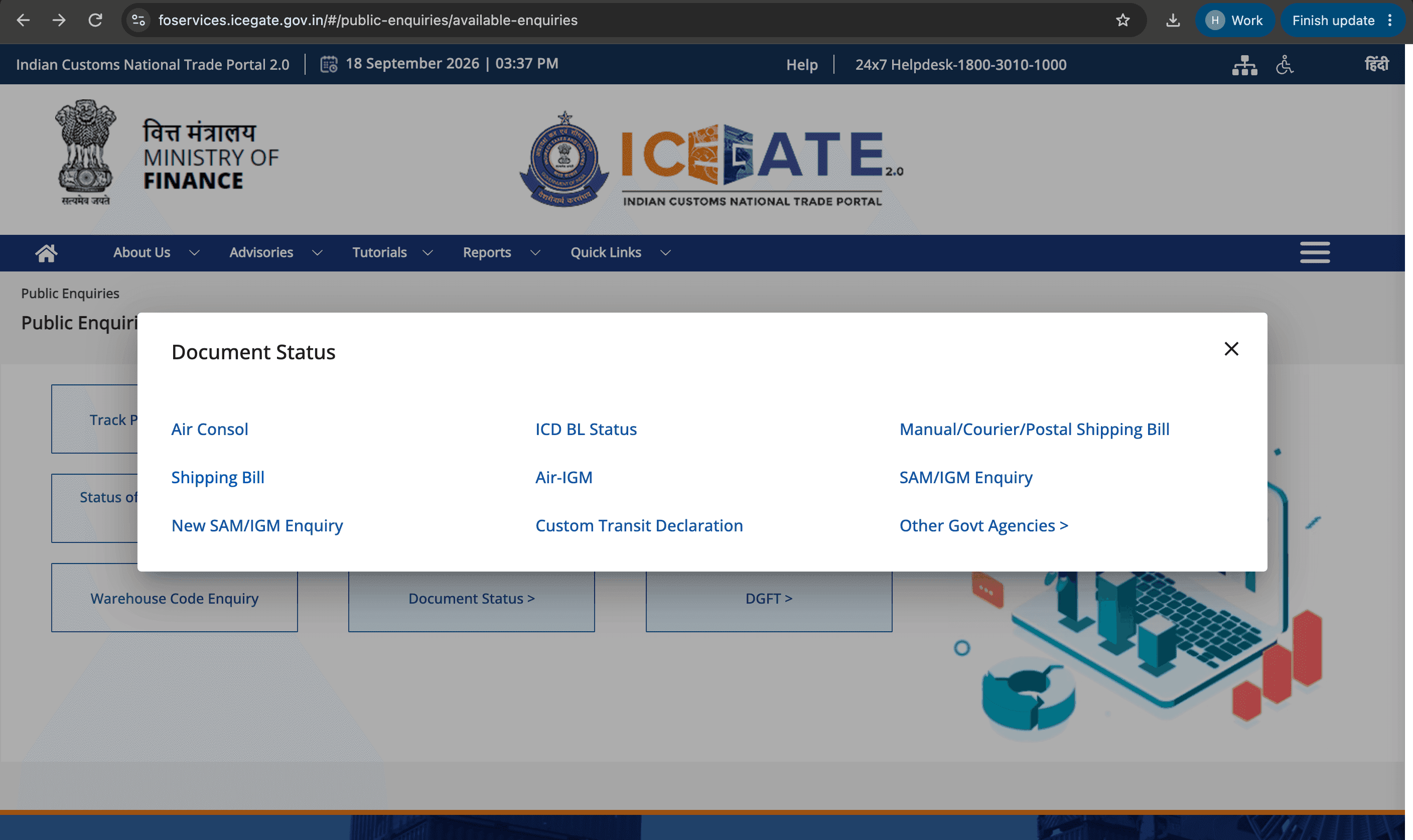
- Click "Document Status," then select "Shipping Bill" from the document type options.
- Pick your customs port code from the "Select Location" dropdown.
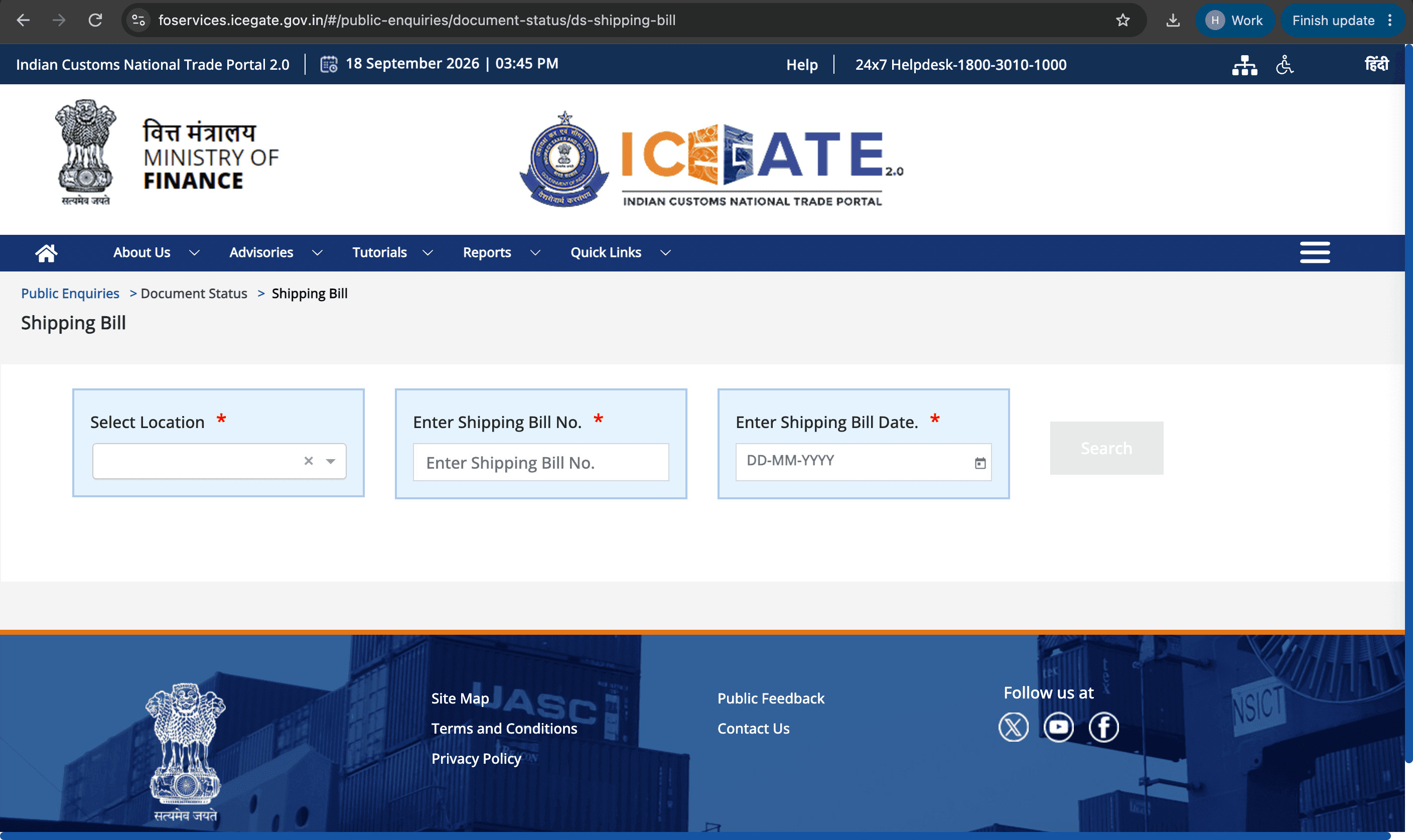
- A shipping bill filed at Nhava Sheva will not surface if you select Mundra, and this is the most common input error.
- Enter the Shipping Bill number and Shipping Bill date exactly as filed, in DD/MM/YYYY format, then click Search.
- The result shows current status, filing details, and related tabs such as LEO details and EGM status where applicable. Click through all the tabs, because the summary screen does not show everything.
Checking Shipping Bill Status With Login (Detailed View and Document Download)
- Log in to icegate.gov.in with your registered ICEGATE credentials, which are IEC-linked.
- From the dashboard, follow Services, Enquiry, Public Enquiries 2.0, Document Status, Shipping Bill. For the signed copy, use the Document Download Utility instead.
- Enter port code, Shipping Bill number and date.
The logged-in view adds full processing history with timestamps, query details and customs officer remarks, LEO details, and EGM status.
Downloading the digitally signed Shipping Bill PDF requires login. It is free and usable as many times as you need, and banks, DGFT and GST refund claims all accept it.
If you see "No record found" immediately after filing, wait 30 to 60 minutes and re-enter the details. Status updates take a few hours to reflect after a customs officer takes action.
What Do the Shipping Bill Status Codes Mean?
The shipping bill status codes on ICEGATE indicate the exact stage your export declaration has reached in customs processing and, critically, what you cannot do yet at each stage.
| Status | What it means | Your next action | Can goods leave? |
|---|---|---|---|
| SB Submitted / Under Processing | Filed and logged by customs, waiting on the first review | Wait, then check again later the same day | Not yet |
| Under Assessment | Customs is checking classification, value and documents | Wait, and keep your CHA reachable for queries | Not yet |
| Query Raised / Pending Clarification | Customs has found a discrepancy and needs a response | Act immediately. Your CHA has to reply, and the clock stops until they do | Blocked |
| Examination Pending / Exam Scheduled | A physical inspection of the consignment is scheduled | Make sure the goods and documents are available at the shed | Not yet |
| Goods Examined / Exam Complete | Physical verification has passed | Wait for LEO | Not yet |
| LEO Given (Let Export Order) | Final customs clearance is granted | Coordinate loading with the shipping line | Yes |
| EGM Filed | The carrier has manifested the goods as departed | Track refund and incentive processing | Departed |
| Rejected / SB Cancelled | Customs did not accept the declaration | Refile after correcting the underlying issue | Blocked |
- Status labels vary slightly by port depending on the ICES version in use, but they all map to the stages above.
- For a clean filing with accurate documents, LEO typically comes through in about 1 to 3 working days. Anything materially longer usually means an unanswered query rather than a slow officer.
- IGST refund processing begins only after both LEO Given and EGM Filed are confirmed. Neither one on its own is sufficient.
LEO granted does not mean your IGST refund is already processing. EGM filing by the shipping line is a separate step: the carrier has to manifest the goods as departed before ICEGATE can send the data to GSTN.

What Documents Are Needed to Check Shipping Bill Status on ICEGATE?
To check your shipping bill status on ICEGATE, you need three pieces of information: the Shipping Bill Number, the Shipping Bill Date, and the customs location, or port code, where the bill was filed.
- Shipping Bill Number: the unique reference number assigned when your CHA filed the declaration. It typically starts with a digit corresponding to the port code.
- Shipping Bill Date: the date the shipping bill was filed with customs, which is different from the shipment date and the invoice date.
- Customs location, or port code: ICEGATE requires you to select the location where the shipping bill was filed, such as ICD Tughlakabad or Nhava Sheva Sea. Selecting the wrong port returns no record even when the bill exists. On DGFT portals, the same locations are referenced by numerical port codes.
If you have lost your shipping bill number, there are three quick places to look.
- Your export invoice. Your accounts team may have recorded the shipping bill reference there.
- Your CHA. They filed the document and will have the number immediately.
- The Bill of Lading or the commercial invoice issued by your freight forwarder. The shipping bill number is often noted in the remarks or reference section.
How Does Skydo Help Receive International Payments?
Once your shipping bill clears, with LEO granted and EGM filed, the customs side is done. The next bottleneck is getting your foreign payment into your account fast, without hidden charges, and with the compliance documents your bank and DGFT require.
- Flat fees on every payment: Indian exporters receiving international payments through banks or PayPal typically lose up to 8% to hidden fees and poor exchange rates. Skydo charges a flat fee instead: ₹19 flat for payments under $2,000, $29 flat for payments of $2,000 to $10,000, and 0.3% for payments above $10,000.
- Free virtual accounts: you get accounts in USD, EUR, GBP, SGD, AUD and CAD. Your foreign buyer pays into the virtual account as if paying a local bank, which eliminates SWIFT friction and intermediary deductions.
- 5-minute setup: there are no monthly fees, so you pay only when you transact.
- A free FIRA with every transaction: the Foreign Inward Remittance Advice (FIRA) certificate is your proof of receipt for your bank, GST refund claims and DGFT filings, the same compliance paper trail your shipping bill status is building toward.
- eBRC closure assistance: link your DGFT account once, then bulk-upload shipping bills to auto-map IRMs and generate eBRC in a single click, connecting your cleared shipping bills directly to your export benefit claims.
- EDPMS closure assistance: you get help closing RBI export tracking entries within regulatory timelines.
- Settlements within 1 working day: predictable and trackable, without the RM calls or SWIFT copy chasing that traditional bank settlements require.
- India-based support: reach the team over WhatsApp, call or text, with no global queue.
How long does it take for shipping bill status to update on ICEGATE after filing?
Status updates take a few hours to reflect after a customs officer takes action. If you see "No record found" immediately after filing, wait 30 to 60 minutes before re-checking.
Can I check my shipping bill status on the old ICEGATE portal?
Which shipping bill status is required before I can claim an IGST refund?
Why is my shipping bill not appearing on the DGFT portal for RODTEP or RoSCTL claims?
Does LEO Granted mean my IGST refund is automatically processing?
What Should You Do If Your Shipping Bill Status Shows an Error?